Voice to mind map
Say it out loud.
Get a mind map.
KiteMind turns what you say into a mind map on iPhone, iPad and Mac. Tap the mic, talk the way you’d explain it to a friend, and the AI lays out the branches in about five seconds. Speech recognition and the AI both run on your device, so your words aren’t sent to a server.
- Speech recognition on device
- Change it by voice, one branch at a time
- Unlimited AI, no credits
Updated
How it works
From your voice to a map
No recording to upload and no transcript to clean up. What you say becomes text on the device and goes straight to the on-device AI.
- Tap the micIt’s in the input box at the top of the home screen. Tap once to start and again when you’re done; there’s nothing to hold down.
- Say what’s on your mindFull sentences are fine: “Plan my move: packing, utilities, change of address and cleaning.” Your words appear in the box as you speak, and you can fix any of them before sending.
- Get the mapThe on-device AI picks a structure (a mind map, or a flowchart if you describe steps and conditions) and draws it in about five seconds.
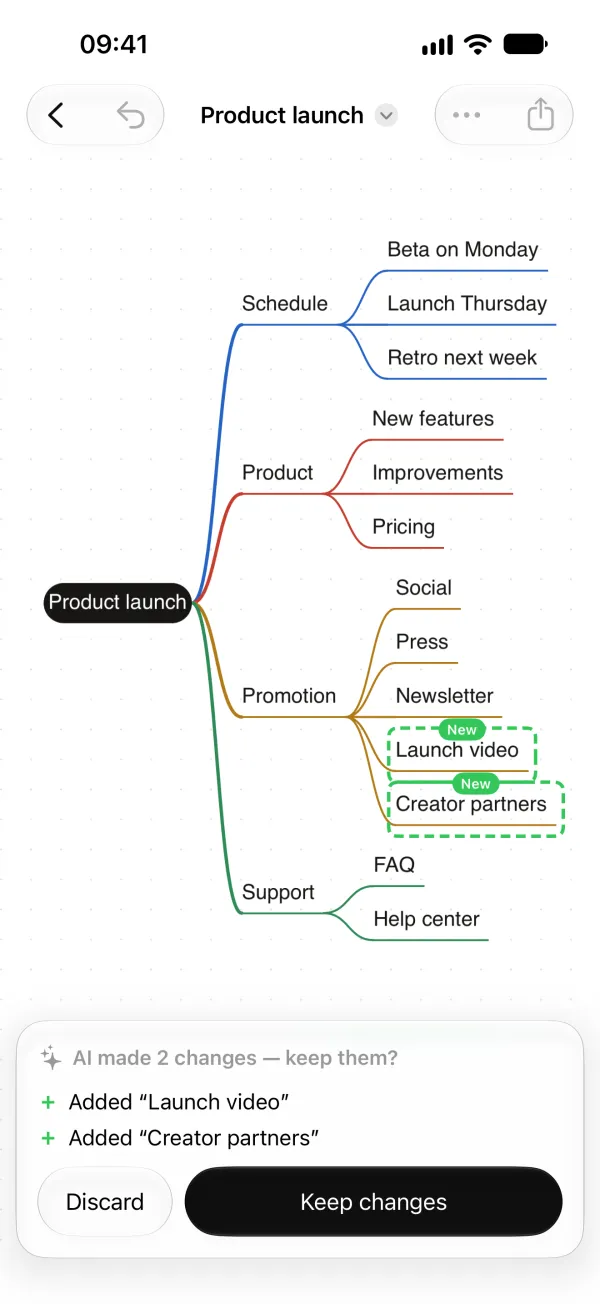
- Keep talking to change itThe bar under the map has a mic too. Say “add a budget branch” and only that part changes. You see the change first and keep it only if you want it.
The first time you use voice input in a language, Apple’s speech model for it is downloaded once (tens of MB; needs a connection). After that, voice input also works offline. Voice input needs iOS 26 or macOS 26; drawing with AI also needs a device that supports Apple Intelligence.
Compared
How it differs from cloud AI mind map apps
Plenty of apps can draw a mind map from a prompt. The difference is where your words go and what you pay each time.
| KiteMind | Typical cloud AI apps | |
|---|---|---|
| Speech to text | On the device | Often uploaded for transcription |
| Where the AI runs | On the device (Apple Intelligence) | On the provider’s servers |
| Offline | Works in airplane mode once the speech model is installed | Needs a connection |
| AI limits | Unlimited, no credits | Monthly credits or caps are common |
| Price | Free; Pro is a one-time $9.99 | Usually a subscription |
| Account | None | Usually required |
On the Mac and iPad
The mic sits next to the map
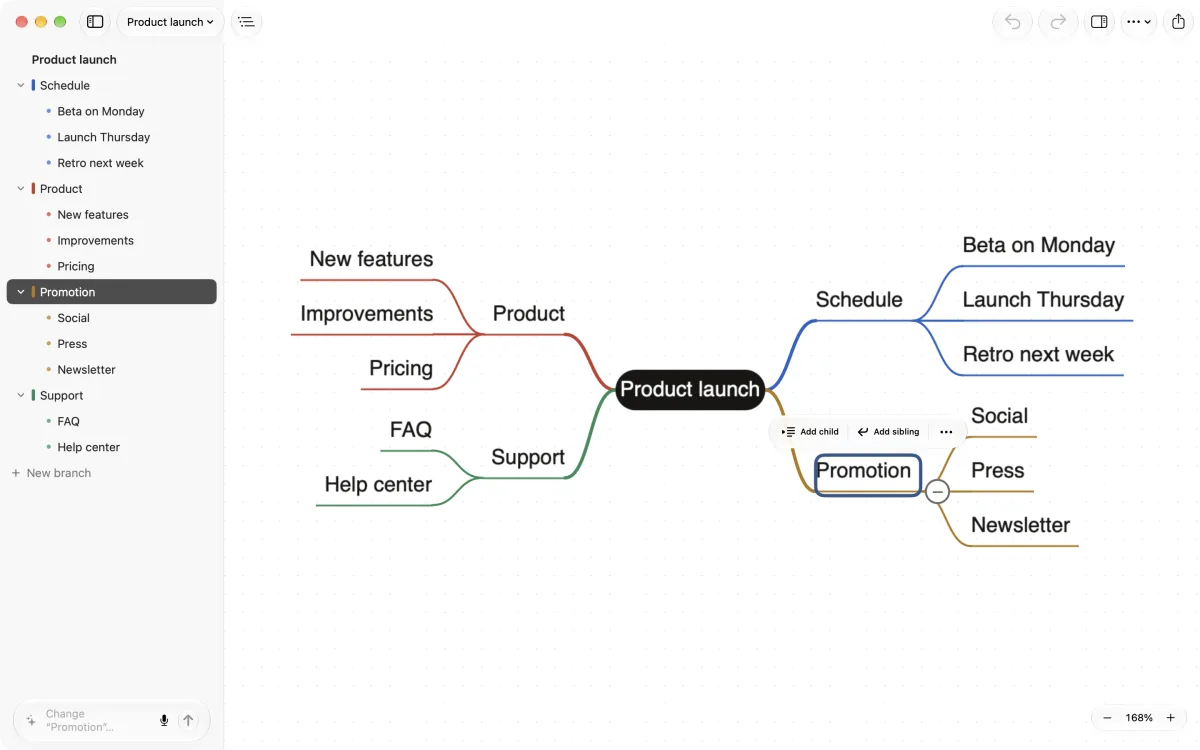
- Select a branch and the AI bar reads “Change ‘Promotion’…”: what you say next goes to that branch.
- Talk through the big picture, then switch to the keyboard: Return adds a topic, Tab a subtopic.
- On the Mac, the outline sits beside the map. Edit either one and the other follows.
- Maps sync between iPhone, iPad and Mac through your own iCloud.
When it helps
When typing is the slow part
On the move
Talk a plan through while it’s fresh, on a walk or between meetings, and tidy the map later.
Brainstorming alone
Say ideas as they come. When you run dry, ask for more: “add three more ideas under marketing”.
Right after a meeting
Say the decisions and next steps out loud and have them organized before you forget them.
A trip or a move
“Plan a two-day weekend trip and work out what comes first” is one of the examples in the app.
Studying
Explain a topic out loud and see how it fits together, and where the gaps are.
A decision to make
“Should I take this job? Lay out everything worth weighing” gives you something concrete to think with.
FAQ
Questions about this
Does voice input need an internet connection?
Only once per language, to download Apple’s speech model. After that, speech recognition and the AI both run on your device and work in airplane mode.
Which languages and devices does it work with?
Voice input listens in your device’s language and needs iOS 26, iPadOS 26 or macOS 26. If Apple’s on-device speech recognition doesn’t support that language yet, the mic button doesn’t appear. Turning what you say into a map needs Apple Intelligence, for example on iPhone 15 Pro or later, or an iPad or Mac with M1 or later.
Can I edit the map by voice too?
Yes. The bar under the map has its own mic. Select a branch first if you want the change to go there. Every change shows up as a preview with Keep changes and Discard, and on iPhone you can shake to undo.
Is it really free?
Yes. Drawing, editing and AI, voice input included, are unlimited in the free version. Pro is a one-time $9.99, not a subscription: exports without a watermark, SVG and high-resolution PNG, all 12 styles, and images and icons in nodes.
Guides
More ways to use KiteMind
Free to start. AI with no limits.
Drawing, editing and AI are unlimited in the free version. Pro is a one-time $9.99: no subscription, no account.